
TileDB Global Database for GEDI Data#
Important
If you use the database for your publications, please acknowledge that the dataset has been processed using gediDB:
Besnard, S., Dombrowski, F., & Holcomb, A. gediDB [Computer software]. https://doi.org/10.5281/zenodo.13885229.
Overview#
The publicly available TileDB global database, managed by the Global Land Monitoring group at GFZ-Potsdam, stores all processed GEDI version 2 data with a robust and scalable architecture. All granules for the products L2A, L2B, L4A, and L4C have been ingested into the database. The data is stored in a Ceph object storage managed by the GFZ data center, with a current size of approximately 20TB. It enables efficient spatial, temporal, and attribute-based queries. This page provides an overview of the database setup, configuration, and access methods using the gediDB package.
Ceph Object Storage Configuration#
The TileDB global database utilizes a Ceph object storage backend to efficiently manage and distribute GEDI data. Below are the key characteristics of the Ceph bucket:
Bucket Name:
dog-ext.gedidb.gedi-l2-l4-v002.0Access Endpoint:
https://s3.gfz-potsdam.deRegion:
eu-central-1Total Storage Used: ~13TB
Access Control: Public
Query Support: Optimized for spatial and temporal queries
For users accessing the database programmatically, interactions with the Ceph bucket are abstracted by the gediDB package, which retrieves data seamlessly from TileDB. Advanced users with direct access to the Ceph storage layer may utilize S3-compatible tools (such as aws s3api or rclone) to interact with the data.
Warning
The bucket dog.gedidb.gedi-l2-l4-v002 has been deprecated and is no longer maintained.
Please update any existing scripts or configurations to use the new bucket
dog-ext.gedidb.gedi-l2-l4-v002.0.
TileDB Database Configuration#
The database configuration defines key parameters for data storage, tiling, and query efficiency. A critical aspect of the database is the application of spatial consolidation, where fragments belonging to the same 10x10-degree spatial windows are consolidated together. This strategy significantly enhances query performance by reducing the number of fragments accessed during spatial queries.
Below is the structure of the configuration file used to build the TileDB database:
# database parameters
tiledb:
  storage_type: 's3'
  s3_bucket: "dog-ext.gedidb.gedi-l2-l4-v002.0"
  url: "https://s3.gfz-potsdam.de"
  overwrite: true
  temporal_batching: "annual"
  time_range:
    start_time: "2019-01-01"
    end_time: "2030-12-31"
  spatial_range:
    lat_min: -56.0
    lat_max: 56.0
    lon_min: -180.0
    lon_max: 180.0
  dimensions: ['latitude', 'longitude', 'time']
  consolidation_settings:
    fragment_size: 200_000_000_000   # 200 GB target fragment size
    memory_budget: "8589934592"      # 8 GB read buffer
    memory_budget_var: "4294967296"  # 4 GB for variable-length attributes
  cell_order: "hilbert"
  capacity: 200000
  latitude_tile: 6
  longitude_tile: 6
  flush_every: 200
The configuration file contains:
Storage Type: Specifies s3 for cloud-based storage.
Time Range: Defines the global temporal coverage.
Spatial Range: Sets the global bounding box for latitude and longitude.
S3 Settings: Configures connection and request parameters for S3.
Note
The current database architecture is somewhat experimental, and different approaches may be more suitable to improve the speed of spatial and temporal queries. Users are encouraged to provide feedback and suggestions for optimizing the tileDB database configuration.

Figure 2: Internal storage structure of the GEDI TileDB database. The left panel shows the global distribution of TileDB fragments (blue outlines) overlaid on a log-scale shot density heatmap (shots per degree²). The top-right panel shows shot density as a function of latitude, reflecting the latitudinal gradient in GEDI orbital coverage. The bottom-right panel shows the fragment size distribution ranked by shot count, coloured by absolute latitude centroid.#
List of the available variables#
The database includes a wide range of variables, covering spatial coordinates, elevation data, vegetation metrics, biomass estimates, and quality flags across multiple GEDI products (L2A, L2B, L4A, L4C). Below is a table of available variables stored in the database:
Variable Name |
Description |
Units |
Product |
|---|---|---|---|
agbd |
Aboveground biomass density |
Mg/ha |
L4A |
agbd_a1 |
Aboveground biomass density - algorithm setting group 1 |
Mg/ha |
L4A |
agbd_a2 |
Aboveground biomass density - algorithm setting group 2 |
Mg/ha |
L4A |
agbd_a5 |
Aboveground biomass density - algorithm setting group 5 |
Mg/ha |
L4A |
agbd_pi_lower |
Lower prediction interval for aboveground biomass density |
Mg/ha |
L4A |
agbd_pi_upper |
Upper prediction interval for aboveground biomass density |
Mg/ha |
L4A |
agbd_se |
Standard error of aboveground biomass density |
Mg/ha |
L4A |
agbd_t |
Model prediction in fit units |
adimensional |
L4A |
agbd_t_se |
Model prediction standard error in fit units |
adimensional |
L4A |
algorithmrun_flag |
The L2B algorithm run flag |
adimensional |
L2B |
beam_name |
Name of the beam |
adimensional |
L2A |
beam_type |
Type of beam used |
adimensional |
L2A |
cover |
Total canopy cover |
Percent |
L2B |
cover_z |
Cumulative canopy cover vertical profile [profile: 30 height bins, 0-145 m] |
Percent |
L2B |
cp_height |
Canopy profile relative height metrics at 1% interval [profile: 101 percentile points, 0-100] |
Meters |
L2B |
cp_pavd |
Canopy profile Plant Area Volume Density at 1% interval [profile: 101 percentile points, 0-100] |
m²/m³ |
L2B |
degrade_flag |
Flag indicating degraded state of pointing and/or positioning information |
adimensional |
L2A |
digital_elevation_model |
TanDEM-X elevation at GEDI footprint location |
Meters |
L2A |
digital_elevation_model_srtm |
STRM elevation at GEDI footprint location |
Meters |
L2A |
dz |
Vertical step size of foliage profile |
Meters |
L2B |
elev_highestreturn_a1 |
Elevation of the highest return detected using algorithm 1, relative to reference ellipsoid |
Meters |
L2A |
elev_highestreturn_a2 |
Elevation of the highest return detected using algorithm 2, relative to reference ellipsoid |
Meters |
L2A |
elev_lowestmode |
Elevation of center of lowest mode relative to reference ellipsoid |
Meters |
L2A |
energy_total |
Total energy detected in the waveform |
adimensional |
L2A |
fhd_normal |
Foliage Height Diversity |
adimensional |
L2B |
l2_quality_flag |
Flag identifying the most useful L2 data for biomass predictions |
adimensional |
L4A |
l2a_quality_flag |
L2A quality flag |
adimensional |
L2B |
l2b_quality_flag |
L2B quality flag |
adimensional |
L2B |
l4_quality_flag |
Flag simplifying selection of most useful biomass predictions |
adimensional |
L4A |
landsat_treecover |
Tree cover in the year 2010, defined as canopy closure for all vegetation taller than 5 m in height as a percentage per output grid cell |
Percent |
L2A |
landsat_water_persistence |
Percent UMD GLAD Landsat observations with classified surface water |
Percent |
L2A |
leaf_off_doy |
GEDI 1 km EASE 2.0 grid leaf-off start day-of-year |
adimensional |
L2A |
leaf_off_flag |
GEDI 1 km EASE 2.0 grid flag |
adimensional |
L2A |
leaf_on_cycle |
Flag that indicates the vegetation growing cycle for leaf-on observations |
adimensional |
L2A |
leaf_on_doy |
GEDI 1 km EASE 2.0 grid leaf-on start day-of-year |
adimensional |
L2A |
modis_nonvegetated |
Percent non-vegetated from MODIS MOD44B V6 data |
Percent |
L2A |
modis_nonvegetated_sd |
Percent non-vegetated standard deviation from MODIS MOD44B V6 data |
Percent |
L2A |
modis_treecover |
Percent tree cover from MODIS MOD44B V6 data |
Percent |
L2A |
modis_treecover_sd |
Percent tree cover standard deviation from MODIS MOD44B V6 data |
Percent |
L2A |
num_detectedmodes |
Number of detected modes in rxwaveform |
adimensional |
L2A |
omega |
Foliage Clumping Index |
adimensional |
L2B |
pai |
Total Plant Area Index |
m²/m² |
L2B |
pai_z |
Plant Area Index profile [profile: 30 height bins, 0-145 m] |
m²/m² |
L2B |
pavd_z |
Plant Area Volume Density profile [profile: 30 height bins, 0-145 m] |
m²/m³ |
L2B |
pft_class |
GEDI 1 km EASE 2.0 grid Plant Functional Type (PFT) |
adimensional |
L2A |
pgap_theta |
Total Gap Probability (theta) |
adimensional |
L2B |
pgap_theta_error |
Total Pgap (theta) error |
adimensional |
L2B |
predict_stratum |
Prediction stratum name for the 1 km cell |
adimensional |
L4A |
predictor_limit_flag |
Prediction stratum identifier (0=in bounds, 1=lower bound, 2=upper bound) |
adimensional |
L4A |
quality_flag |
Flag simplifying selection of most useful data |
adimensional |
L2A |
region_class |
GEDI 1 km EASE 2.0 grid world continental regions |
adimensional |
L2A |
response_limit_flag |
Prediction value outside bounds of training data (0=in bounds, 1=lower bound, 2=upper bound) |
adimensional |
L4A |
rg |
Integral of the ground component in the RX waveform |
adimensional |
L2B |
rh |
Relative height metrics at 1% interval [profile: 101 percentile points, 0-100] |
Meters |
L2A |
rh100 |
Height above ground of the received waveform signal start |
cm |
L2B |
rhog |
Volumetric scattering coefficient (rho) of the ground |
adimensional |
L2B |
rhog_error |
Rho (ground) error |
adimensional |
L2B |
rhov |
Volumetric scattering coefficient (rho) of the canopy |
adimensional |
L2B |
rhov_error |
Rho (canopy) error |
adimensional |
L2B |
rossg |
Ross-G function |
adimensional |
L2B |
rv |
Integral of the vegetation component in the RX waveform |
adimensional |
L2B |
rx_algrunflag |
Flag indicating signal was detected and algorithm ran successfully |
adimensional |
L2A |
rx_maxamp |
Maximum amplitude of rxwaveform relative to mean noise level |
adimensional |
L2A |
rx_range_highestreturn |
Range to signal start |
Meters |
L2B |
sd_corrected |
Noise standard deviation, corrected for odd/even digitizer bin errors based on pre-launch calibrations |
adimensional |
L2A |
selected_algorithm |
Identifier of algorithm selected as identifying the lowest non-noise mode |
adimensional |
L2A |
selected_l2a_algorithm |
Selected L2A algorithm setting |
adimensional |
L2B |
selected_rg_algorithm |
Selected R (ground) algorithm |
adimensional |
L2B |
sensitivity |
Maxmimum canopy cover that can be penetrated |
adimensional |
L2A |
sensitivity_a1 |
Geolocation sensitivity factor A1 |
adimensional |
L2A |
sensitivity_a2 |
Geolocation sensitivity factor A2 |
adimensional |
L2A |
shot_number |
Unique identifier for each shot |
adimensional |
L4C |
solar_azimuth |
Solar azimuth angle at the time of the shot |
Degrees |
L2A |
solar_elevation |
Solar elevation angle at the time of the shot |
Degrees |
L2A |
stale_return_flag |
Flag indicating return signal above detection threshold was not detected |
adimensional |
L2B |
surface_flag |
Identifier of algorithm selected as identifying the lowest non-noise mode |
adimensional |
L2A |
toploc |
Sample number of highest detected return |
adimensional |
L2A |
urban_proportion |
The percentage proportion of land area within a focal area surrounding each shot that is urban land cover. |
Percent |
L2A |
wsci |
Waveform Structural Complexity Index |
adimensional |
L4C |
wsci_pi_lower |
Waveform Structural Complexity Index lower prediction interval |
adimensional |
L4C |
wsci_pi_upper |
Waveform Structural Complexity Index upper prediction interval |
adimensional |
L4C |
wsci_quality_flag |
Waveform Structural Complexity Index quality flag |
adimensional |
L4C |
wsci_xy |
Horizontal Structural Complexity |
adimensional |
L4C |
wsci_xy_pi_lower |
Horizontal Structural Complexity lower prediction interval |
adimensional |
L4C |
wsci_xy_pi_upper |
Horizontal Structural Complexity upper prediction interval |
adimensional |
L4C |
wsci_z |
Vertical Structural Complexity |
adimensional |
L4C |
wsci_z_pi_lower |
Vertical Structural Complexity lower prediction interval |
adimensional |
L4C |
wsci_z_pi_upper |
Vertical Structural Complexity upper prediction interval |
adimensional |
L4C |
zcross |
Sample number of center of lowest mode above noise level |
Nanoseconds |
L2A |
Profile variables#
Several variables are stored as per-shot vertical profiles — each cell in the database holds an array of values rather than a single scalar. When queried via gedidb.GEDIProvider, full profiles are returned as a list per shot. Individual profile points can be fetched using the "variable:label" syntax (see Data Provider).
Variable |
Product |
Profile labels |
Label meaning |
Length |
|---|---|---|---|---|
|
L2A |
0, 1, 2, …, 100 |
Percentile |
101 |
|
L2B |
0, 1, 2, …, 100 |
Percentile |
101 |
|
L2B |
0, 1, 2, …, 100 |
Percentile |
101 |
|
L2B |
0, 5, 10, …, 145 |
Height above ground (m) |
30 |
|
L2B |
0, 5, 10, …, 145 |
Height above ground (m) |
30 |
|
L2B |
0, 5, 10, …, 145 |
Height above ground (m) |
30 |
Note
Percentile-profile variables (rh, cp_height, cp_pavd)
These variables store 101 values per shot, one per integer percentile of the
canopy height or PAVD distribution (0 - 100). In the returned
xarray.Dataset they appear as a 2-D variable with a named
profile_points coordinate carrying the percentile integers:
ds = provider.get_data(variables=["rh"], ...)
ds.rh.sel(profile_points=98)   # 98th-percentile canopy height
ds.rh.sel(profile_points=50)   # median canopy height
Height-bin profile variables (cover_z, pai_z, pavd_z)
These variables store 30 values per shot at 5 m height steps from 0 to
145 m above ground. The profile_points coordinate carries the bin
midpoints in metres:
ds = provider.get_data(variables=["cover_z"], ...)
ds.cover_z.sel(profile_points=50)    # cumulative cover at 50 m height
ds.cover_z.sel(profile_points=0)     # cover at ground level
Single-label selection (saves bandwidth — reads one column instead of all)
Use the "variable:label" syntax to fetch a single profile element at
query time. The result is renamed {variable}_p{label}:
# Percentile: fetch only the 98th-percentile canopy height
df = provider.get_data(variables=["rh:98"], return_type="dataframe", ...)
# → column named 'rh_p98'

# Height bin: fetch cumulative cover at 50 m only
df = provider.get_data(variables=["cover_z:50"], return_type="dataframe", ...)
# → column named 'cover_z_p50'

# Mix profiles and scalars freely
df = provider.get_data(variables=["agbd", "rh:98", "cover_z:50"], ...)
See Data Provider for full details on the query syntax.
Accessing the database#
The gediDB Python package simplifies access to the TileDB global database. Below is an example workflow for querying data.
Example Code:
import geopandas as gpd
import gedidb as gdb

# Instantiate the GEDIProvider
provider = gdb.GEDIProvider(
    storage_type='s3',
    s3_bucket="dog-ext.gedidb.gedi-l2-l4-v002.0",
    url="https://s3.gfz-potsdam.de"
)

# Load region of interest (ROI)
region_of_interest = gpd.read_file('path/to/test.geojson')

# Define variables to query and quality filters
vars_selected = ["agbd", 'rh']

# Query data
gedi_data = provider.get_data(
    variables=vars_selected,
    query_type="bounding_box",
    geometry=region_of_interest,
    start_time="2018-01-01",
    end_time="2024-07-25",
    return_type='xarray'
)
Explanation:
GEDIProvider: Initializes the provider with S3 storage details.
Region of Interest: Defines the geographic area for the query using a GeoJSON file.
Variables: Specifies the variables to extract (e.g., agbd, rh).
Examples and use cases#
Here are some example use cases:
Retrieve Aboveground Biomass Density (AGBD) for a region:
gedi_data = provider.get_data(
    variables=["agbd"],
    query_type="bounding_box",
    geometry=region_of_interest,
    start_time="2018-01-01",
    end_time="2024-07-25",
    return_type='xarray')
Analyze Relative Heights (RH) with additional quality filters:
quality_filters = {"sensitivity": ">= 0.9 and <= 1.0", "beam_type": "== 'full'"}

gedi_data = provider.get_data(
    variables=["rh"],
    query_type="bounding_box",
    geometry=region_of_interest,
    start_time="2018-01-01",
    end_time="2024-07-25",
    return_type='xarray',
    **quality_filters)
Query performance#
Query time scales with the spatial extent of the bounding box. The benchmark was run on a Linux server with dual Intel® Xeon® E5-2643 v4 CPUs (12 cores, 24 threads) and 503 GB RAM, querying data stored on a Ceph object storage cluster (Quincy) comprising 18× DELL R7515 nodes, each equipped with 11-18× 18-20 TB data drives and 1× 1.6 TB NVMe for metadata.
The figure below shows wall-clock query time (and time per km²) as a function of bounding box area for 20 square bounding boxes of increasing size (0.5°-40° side length), all centred on central Europe (51°N, 10°E) and queried over a fixed one-year window (2020). Each box size was repeated three times and the median time is reported. A global archive query over the same period is included as a reference point.
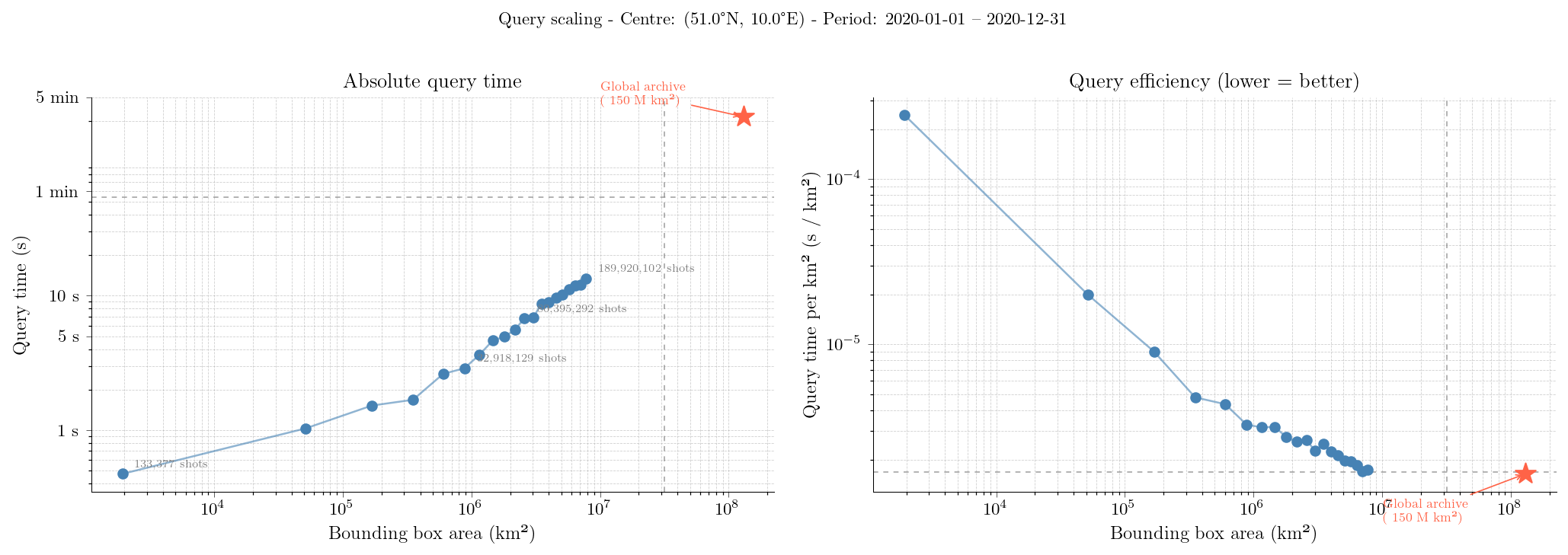
Figure 3: Query scaling for the GEDI TileDB database. Left: absolute wall-clock query time (s) as a function of bounding box area (km²). Right: query time per km², a measure of query efficiency — lower values indicate more efficient use of the consolidated fragment structure for larger spatial extents.#